I turn disconnected operations into software that just works.
Most operational problems do not happen because a business lacks tools. They happen when systems, data, and workflows are not connected properly. I work at the point where business needs meet technical systems, finding manual waste, process gaps, and the opportunity to build something better.

Highlighted work
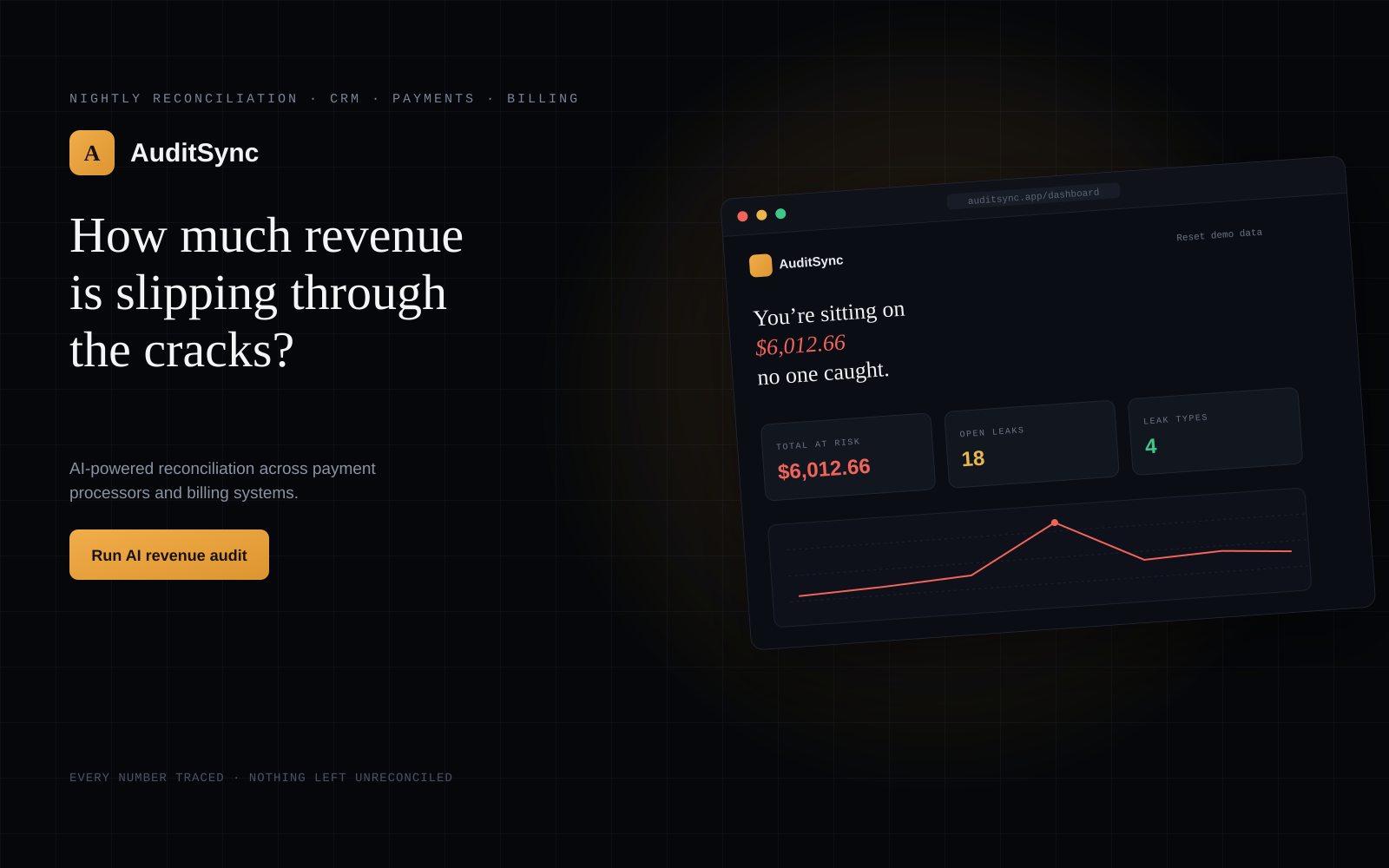
An AI powered platform that reconciles a company's CRM, payments, and billing data automatically, flags what does not match, and explains why in plain English.
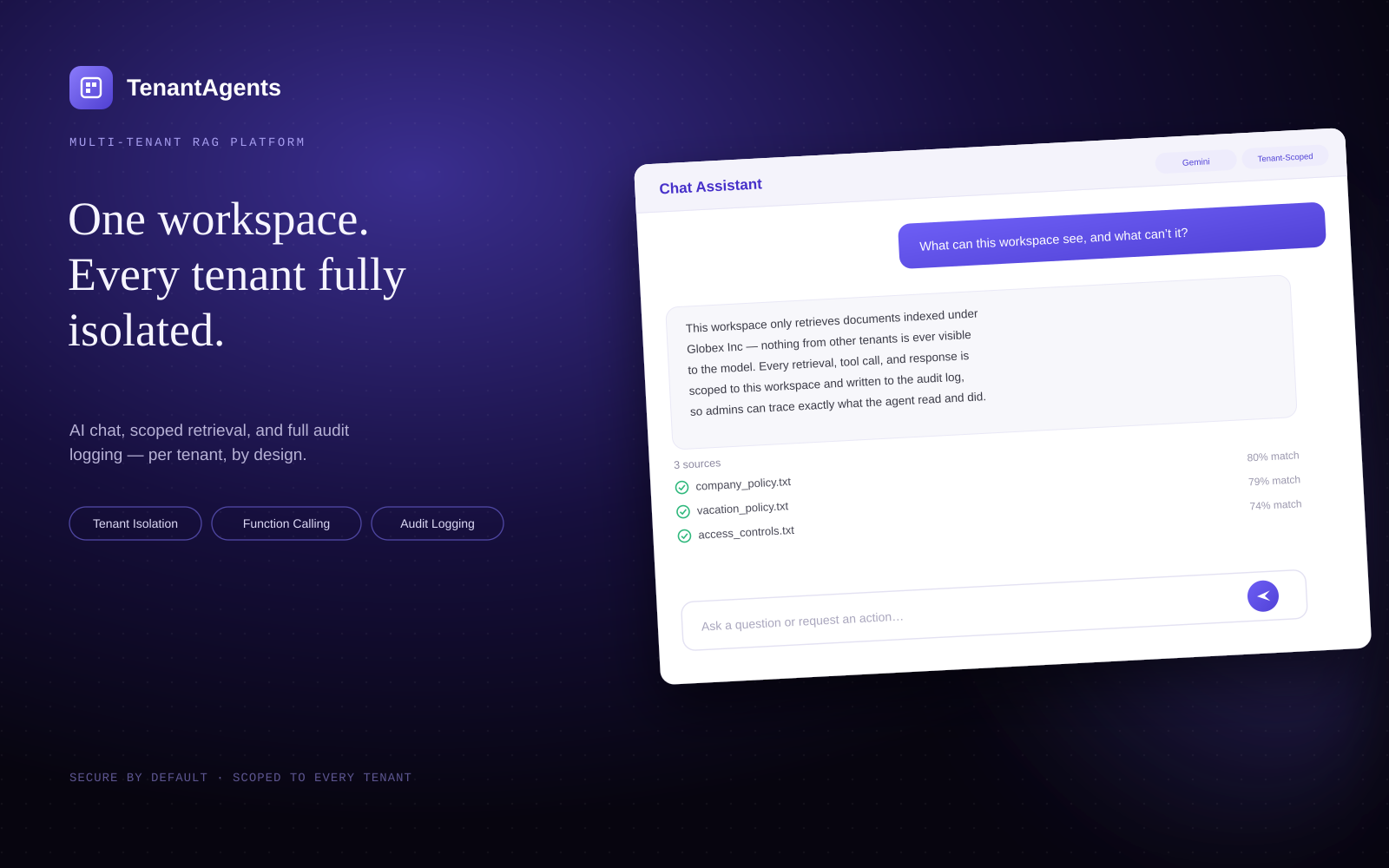
A multi tenant AI agent platform. Every company gets a private assistant that answers questions and takes real action, fully isolated from every other tenant.
Projects
AuditSync
Automated revenue reconciliation across CRM, payments, and billing.
TenantAgents
A multi tenant AI agent platform with database level isolation.
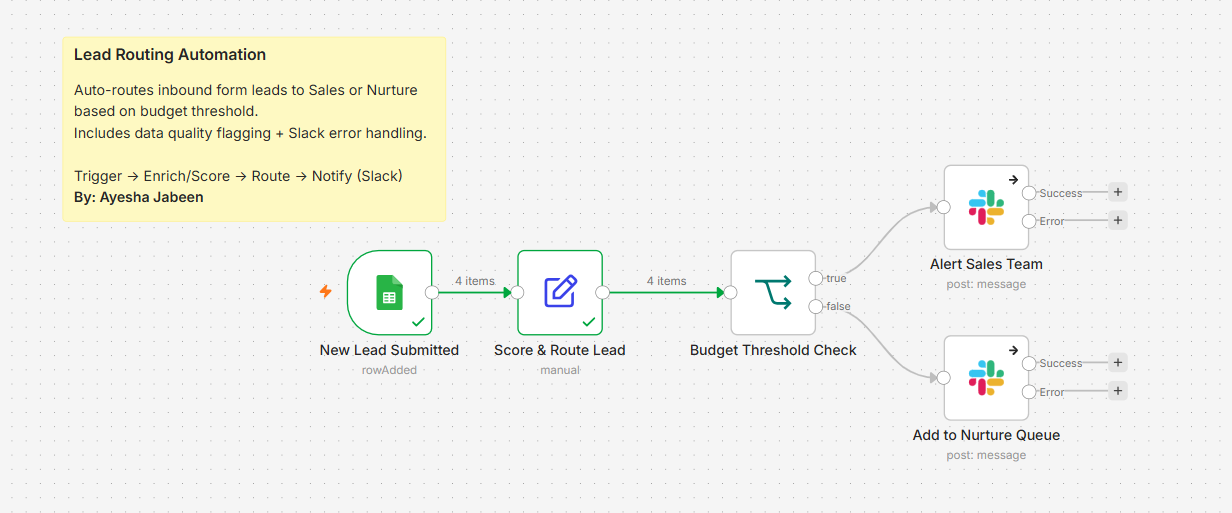
Lead Routing Automation
Scores and routes inbound leads to Slack the moment a form is submitted.
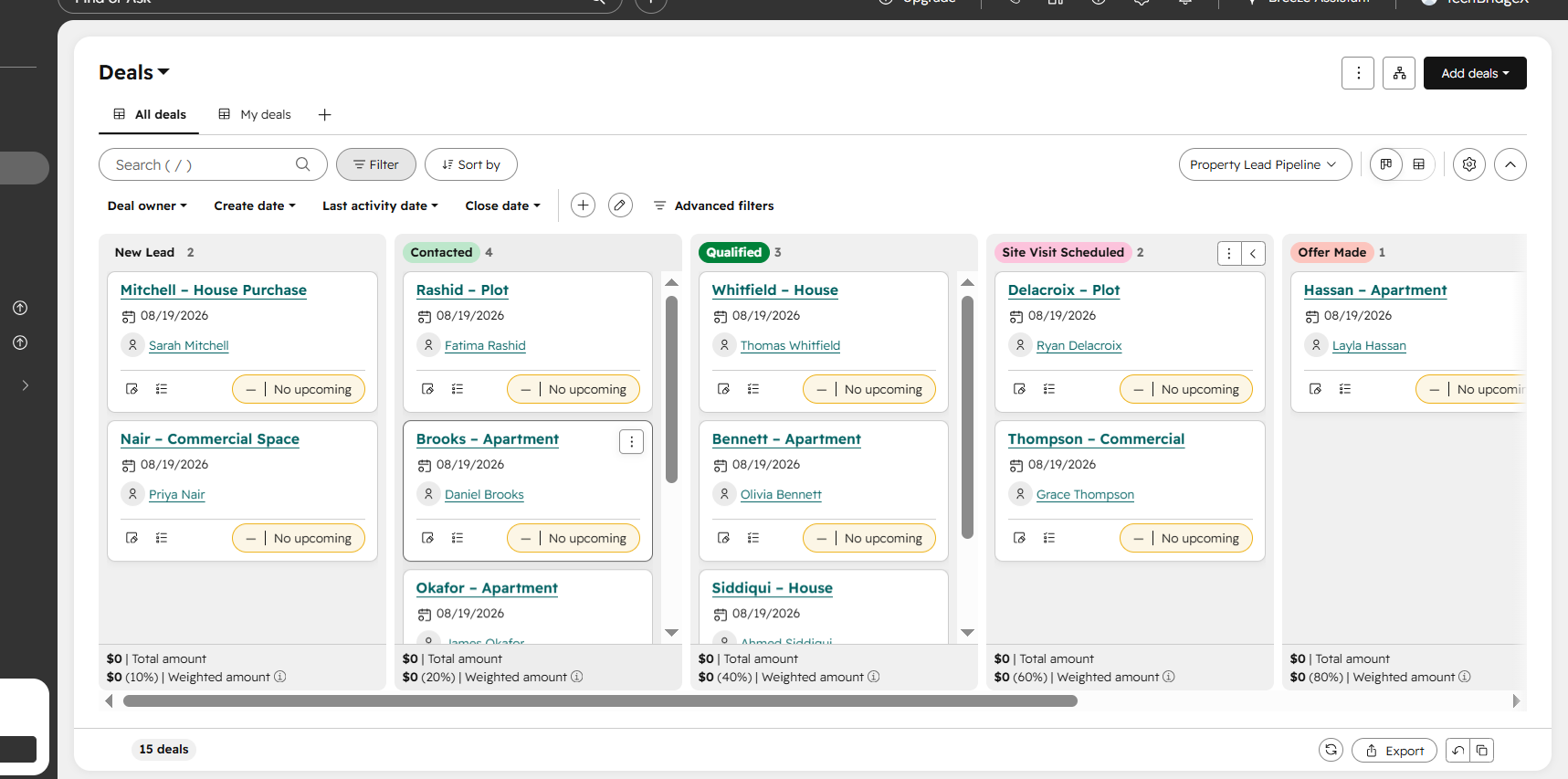
Real Estate CRM Automation
A custom HubSpot pipeline with instant Slack alerts on warm leads.
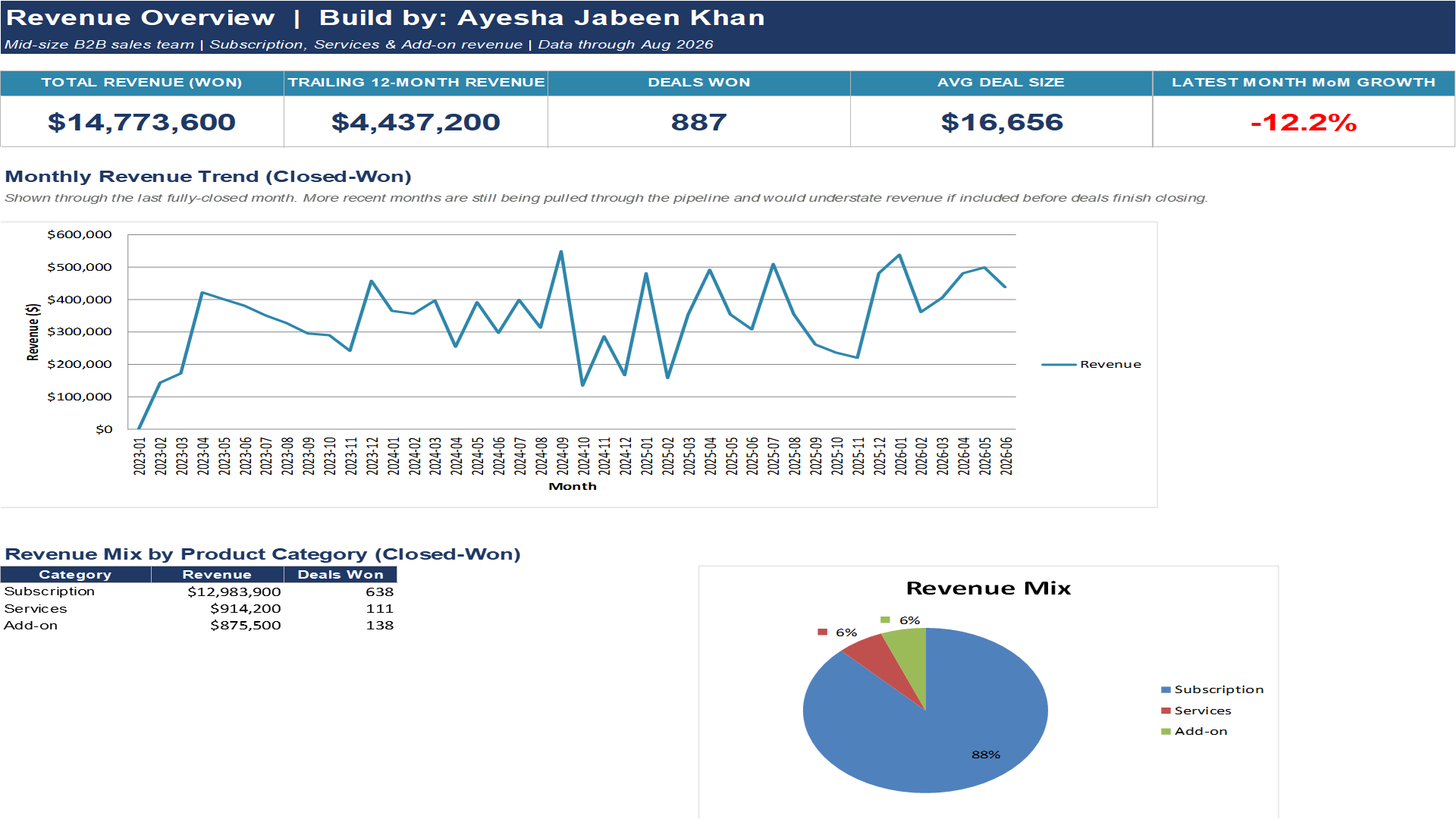
Revenue and Pipeline Analytics
A normalized SQL model turned into an Excel dashboard for stalled deals.
What I bring to a team
◆ Full stack engineering
- APIs and backends in Python and FastAPI
- Next.js and React frontends
- SQL, PostgreSQL, and MongoDB
- Multi tenant architecture
◆ Automation and AI
- RAG pipelines and vector databases
- Gemini and OpenAI function calling
- n8n and Zapier workflows
- Slack and team alerts
◆ Business systems and reporting
- HubSpot and CRM implementation
- Power BI and Excel dashboards
- Pipeline and revenue analysis
- Stakeholder requirements
A quick glance at my background



What people say about working with me
"I recommend Ayesha for any Business Analyst role. She excels at requirements engineering, uncovering the true business needs that stakeholders often miss, which saves significant time and prevents rework. Technically, she is adept at Power BI and SQL, turning raw data into clear, actionable dashboards. She recently led a CRM migration that automated workflows end to end. Ayesha bridges the gap between business and technical teams effortlessly."

"Ayesha Jabeen is an exceptional professional with a strong blend of technical expertise, problem solving skills, and a deep understanding of modern technologies. As a Solution Engineer, she consistently demonstrates the ability to understand complex business requirements and translate them into effective and scalable technical solutions. What particularly stands out is her hands on involvement in AI and Machine Learning, and her ability to apply these technologies to solve real world problems. She is a quick learner, highly collaborative, and always willing to take on challenging tasks."

"I had a chance of interacting with Ayesha out of nowhere and I found her a very talented human being. The grit she has to work and exceed all expectations is second to none. I have rarely seen such people who are extremely growth oriented and want to explore the unexplored aspects of life."

Systems I have built end to end
My work sits across four areas that usually show up together in a growing company. Filter by category, or open any project for the full breakdown.
01 · Business applications
Custom web platforms and backend services designed for operational workflows, when off the shelf tools fall short.
Python · FastAPI · Next.js · React · PostgreSQL02 · Workflow automation
Eliminating manual data entry and triage by connecting existing tools and triggering real time actions.
n8n · Zapier · Google Sheets API · Slack API03 · CRM and revenue operations
Structuring sales pipelines, deal stages, and lead routing so high value opportunities do not drop through the cracks.
HubSpot CRM · Zoho · Pipeline analytics04 · Data and reporting
Turning fragmented operational data into clean SQL models and dashboards leadership can actually act on.
SQL · PostgreSQL · Power BI · PythonAuditSync
Reconciles CRM, payments, and billing automatically, flags what does not match, and alerts finance on Slack before the leak grows.
TenantAgents
Each company gets a private AI assistant over its own documents, that can also take real actions, fully isolated at the database level.
Lead Routing Automation
Scores inbound leads and routes them to the right Slack channel by budget the moment a form is submitted, with no manual triage.
Real Estate CRM Automation
A custom HubSpot pipeline plus a Zapier and Slack alert that pings the sales team the instant a lead goes warm, before it goes cold.
Revenue and Pipeline Analytics
A normalized SQL model of the full deal lifecycle, turned into an Excel dashboard that flags stalled deals before they quietly become lost revenue.
The problem, the build, and the result
Every project below started with a real operational gap. Here is what the problem actually was, what I built, and how it works.
AuditSync
Every number traced. Nothing left unreconciled.
Overview
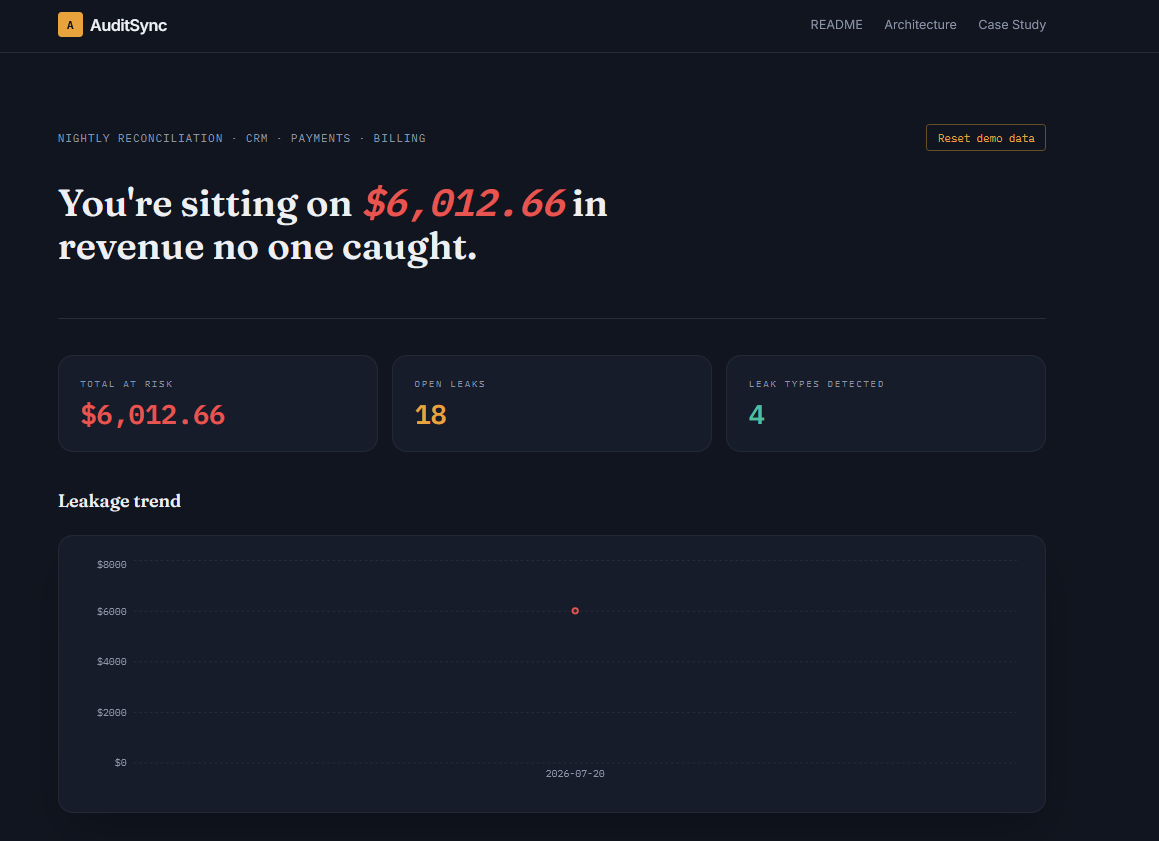
AuditSync reconciles transactions across a company's CRM, payment gateway, and billing system, flags what does not match, and uses Gemini to explain why in plain English, then alerts the finance team on Slack before the leak grows.
The challenge
Revenue reconciliation across disconnected systems is usually done monthly, by hand, in spreadsheets. By the time a mismatch surfaces, the money is often uncollectable.
What it detects
| Leak type | What it means |
|---|---|
| Missing in billing | Payment succeeded but was never invoiced |
| Duplicate charge | Same customer charged the same amount twice within 24h |
| Amount mismatch | Payment processor and billing system disagree on the charge |
| Failed, not retried | Payment failed and was never retried, a silent permanent loss |
Every leak gets a confidence score calculated from the actual transaction signals, not a flat number per leak type, plus an AI generated root cause explanation.
How it works
Click "Run AI revenue audit" to see it work against a realistic seeded dataset, or upload a Payment Processor and Billing CSV and watch it reconcile real data. Uploads are validated on the client before anything reaches the backend, so a wrong file gives an instant, specific error instead of a confusing failure later. A "Reset demo data" button clears everything back to a clean slate so the shared demo never gets messy for the next visitor.
Tech stack
Screenshots
Notable engineering decisions
- Idempotent reconciliation. Clicking reconcile twice used to silently duplicate every leak. Fixed with a per transaction watermark, so re running the job is always safe.
- Confidence scores are calculated, not hardcoded. An earlier version returned a flat number per leak type. Confidence now comes from the real signal, how large a missing payment is, how close together duplicate charges are, how long a failure has gone unretried.
- A simple password gate instead of full auth. The demo needed to be shareable without becoming an open sandbox, but did not need real user accounts at this stage.
- Resilient AI calls. Root cause generation is batched per run to respect Gemini rate limits, with a templated fallback if the API is unavailable.
TenantAgents
Each company gets its own private AI assistant that can answer questions and take real actions.
Overview
Most RAG portfolio projects are a chatbot over one PDF for one user. TenantAgents is built closer to how real SaaS products work, many companies on one platform, each one completely walled off from the others, with an AI agent that does not just talk, it does things.
The challenge
Building an AI assistant over one company's documents is easy enough. The hard part is doing it for many companies on the same platform, safely: Company A should never be able to see Company B's documents, chat history, or data, not even by accident, not even if there is a bug somewhere in the app.
My role and the solution
- Each company gets its own private workspace. Upload documents, chat with an AI that only knows that company's documents, never anyone else's.
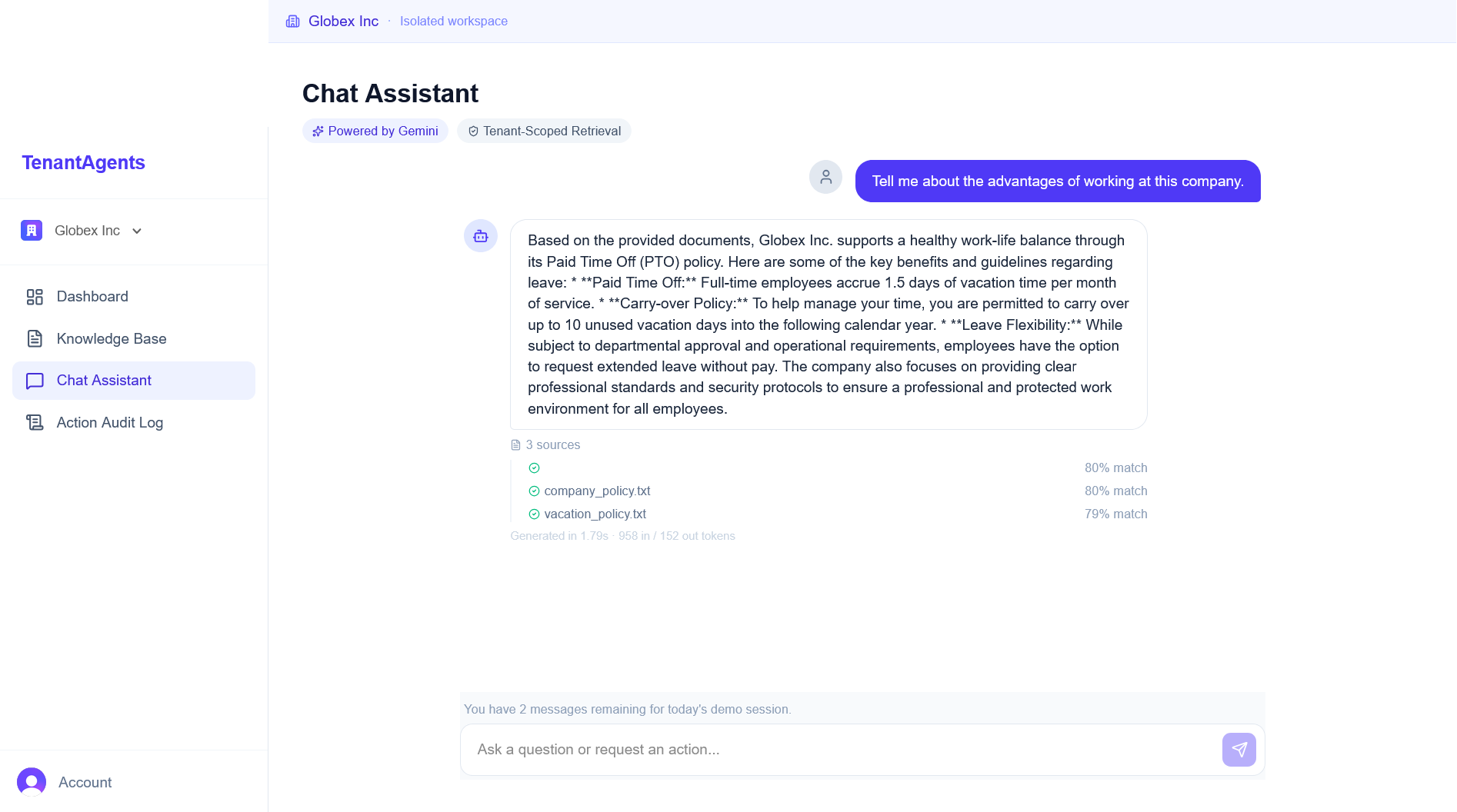
- The AI can take real actions, not just chat. Ask it to create a support ticket or send an email, and it decides to do that on its own using Gemini's function calling, not a hardcoded "if user says X, do Y" script, and every action gets logged to an audit trail.
- Every answer shows its work, which source documents it used, how confident the match was, how long it took, and how many tokens it used.
- Isolation is enforced at the database level, not just hidden in the UI. Every table that holds a company's data has a tenant_id column, and every query checks it, so even a bug in the app logic could not leak data across companies.
A quick walkthrough
- Sign in and pick a company. Two demo companies are ready to go, Acme Corp and Globex Inc, each with its own workspace.
- Upload documents to the Knowledge Base. A .txt or .md file gets split into chunks, embedded, and indexed, ready to be searched.
- Ask the Chat Assistant anything about the documents. It answers using only that company's documents, and shows which sources it pulled from and how confident it was.
- Ask it to do something, like send an email or open a ticket. It decides on its own whether the request needs an action, and every action shows up in the Audit Log with a timestamp and status.
- Check the Dashboard for a live view of the workspace, documents uploaded, questions answered, actions taken, and recent activity.
Tech stack
Screenshots
The honest, unpolished part
Getting a demo running locally is maybe 40% of actually shipping something. A few of the real problems that ate the rest of the time:
- A mystery infinite request loop, only in dev. Turned out OneDrive was silently syncing the project folder, re triggering Next.js's file watcher every second.
- A 404 loading Clerk's own script, only in production. The middleware's path matcher was accidentally excluding the exact path Clerk needs to proxy its script through.
- Redesigned how agent actions work three times. The first version wired actions through n8n to fire real Slack messages. Eventually cut it, an external dependency adding complexity without adding real value over a simple internal audit trail.
Lead Routing Automation
Automates lead intake, scoring, and Slack notification routing based on budget threshold, eliminating manual lead triage from a form submission to a sales alert.
Overview
A lead fills out a form and then sits in a spreadsheet until someone checks it. Manual triage means hot leads wait, and interest fades fast. This workflow removes that step entirely.
Workflow
- Lead submits a form (Google Forms), the response lands in Google Sheets.
- n8n polls the sheet for new rows.
- The lead is scored Hot or Warm, and a data quality flag is applied.
- A budget threshold check routes the lead: $10,000 or more goes to the #sales-leads Slack channel, under $10,000 goes to #nurture-leads.
- Slack delivery includes error branch handling (Continue On Fail), so a failed send is never silently lost.
Result
Stack
Setup
- Import lead-routing-automation.json into an n8n instance.
- Connect your own Google Sheets and Slack credentials.
- Update the budget threshold in the "Score & Route Lead" node if needed.
Notes
Built as a portfolio demo with test data. The threshold, scoring logic, and notification channels are easily adapted for a real pipeline, for example CRM write back, SMS alerts, or multi tier routing.
Real Estate CRM Pipeline + Automated Lead Alerts
A custom HubSpot CRM setup for real estate sales pipelines, paired with a real time Slack alert system using Zapier.
The problem
In real estate, deals are usually lost because of slow response times rather than a lack of interest. If a hot lead sits untouched for even a few hours, they will likely move on to a competitor. The goal was a reliable workflow where the second a lead engages, moving into the Contacted stage, the entire sales team gets pinged instantly.
What I built
- Custom deal pipeline. A seven stage pipeline matching a standard property buying journey: New Lead → Contacted → Qualified → Site Visit Scheduled → Offer Made → Closed Won / Closed Lost.
- Tailored data model. Custom properties across Deals and Contacts to capture Budget Range, Property Type (Apartment, House, Plot, Commercial), Lead Source (Facebook Ad, Referral, Website, Instagram, Walk in), and Site Visit Date.
- Realistic sample data. Fifteen realistic contacts and deals distributed across all pipeline stages, so it reads like a living workspace rather than an empty template.
- Automated lead routing. Whenever a deal changes stage, Zapier catches the update, filters specifically for the Contacted stage, and instantly fires a formatted notification into a dedicated Slack channel with the deal name, budget, property type, and source.
Screenshots
Tech stack
Note on tool limits: HubSpot's free tier does not support native workflow triggers, and Zapier's free plan does not include a native delay action, so the current setup fires instantly on stage change rather than after a delay.
Future upgrades on a paid tier
- A three day delay timer with a no activity filter to catch stalled deals.
- Round robin lead auto assignment based on budget and source.
- Custom lead scoring models based on engagement metrics.
- Urgent SMS alerts alongside the Slack notification.
Revenue & Pipeline Analytics
An end to end analytics project for a mid-size B2B sales team. A normalized SQL database models the full deal lifecycle, and an Excel workbook turns that into three decision-ready dashboards.
Why this project
Most portfolio dashboards stop at "here's revenue by month." This one is built the way a RevOps analyst would actually be asked to: not just report what closed, but flag what's stuck, deals sitting in a stage with no movement, quietly turning into lost revenue before anyone notices.
What's inside
| Page | What it answers |
|---|---|
| 1 — Revenue Overview | How much has closed, how fast is it growing, what's a typical deal worth |
| 2 — Pipeline & At-Risk Deals | Where deals fall out of the funnel, and which open deals need a rep to re-engage this week |
| 3 — Rep & Region Performance | Who's driving revenue, who's carrying open pipeline, how regions compare |
The at-risk pipeline view
A deal is flagged stalled once it has sat in one stage for more than 30 days with no movement, a standard RevOps threshold for "this needs a human, not a report." The dashboard sorts these worst first and color codes severity, so a manager can open the workbook Monday morning and know exactly which deals to ask about in stand up.
Screenshots
Tech stack
Data
The dataset is a reproducible synthetic dataset with a fixed random seed, not a raw drop in of a public dataset. An off the shelf retail transactions dataset has no CRM stage history, so it cannot support a real funnel or a genuine stalled deal analysis, the two things this project is actually trying to demonstrate.
Key findings
- $14.77M in closed won revenue across 887 deals, a 22.7% overall win rate.
- Subscription revenue dominates the mix at 88%, with Services and Add on each around 6%.
- Funnel conversion holds steady in the low to mid 70s% at every stage, with the sharpest drop off between Negotiation and Closed Won at 51%.
- East region and rep Jordan Ellis lead on closed revenue.
- $1.18M, 14.9% of open pipeline, is currently stalled, the action item this dashboard exists to surface.
Software, automation, and business systems
From backend and full stack development to CRM systems and revenue operations. Click Details on any role for the full breakdown.
- Build AI agents and Python automation workflows to help businesses reduce manual work and improve their processes.
- Develop full stack applications that connect AI, backend systems, and automation with day to day business operations.
- Built n8n and Zapier workflows for lead enrichment, account research, and lead routing.
- Created SQL and Power BI dashboards to track KPIs, sales activity, and revenue performance.
- Worked with HubSpot CRM data to understand sales pipelines, find conversion gaps, and improve reporting.
- Organized and structured business data for internal reports and dashboards.
- Worked with technical, sales, and marketing teams to improve reporting and daily workflows.
- Managed B2B lead sourcing, data enrichment, and CRM updates to keep pipeline data accurate.
- Reviewed sales funnel data to find gaps in lead qualification and conversion.
- Researched target customer profiles and tracked B2B campaign performance.
- Built and deployed web applications using MongoDB, Express.js, React, and Node.js.
- Developed REST APIs for backend logic and third party integrations.
- Worked with the development team to build and deliver client facing web applications.
- Built backend services and APIs using Node.js and Express.js.
- Worked on server side logic and supported the development of web applications.

- Coordinated project tasks and communication between remote technical team members.
- Helped keep project work organized and on schedule.
Education

Majored in Information Technology, building both technical skills and an understanding of how businesses operate.

Certifications
Volunteering
Contributed to community development through fundraising, outreach, and child focused initiatives, gaining hands on experience in leadership and teamwork while supporting causes aligned with the UN Sustainable Development Goals.
I look at the business problem before I look at the code

My background in Business and Information Technology shaped the way I approach technical work: I start by understanding how the business operates, then determine where technology can improve the process. I am interested not only in how a system is built, but also in the business problem behind it and how it fits into the way a team actually works.
My experience across software development, business operations, CRM, automation, and data has taught me that choosing the right technology comes after understanding the real problem.
Tools and technologies
 Python
 FastAPI
 Next.js
 React
React PostgreSQL
 MongoDB
 Gemini
 ChatGPT
 Claude
 LangChain
 n8n
n8n Zapier
 HubSpot
 Zoho
Zoho Power BI
 Docker
 Slack
Slack VS Code
How I work
Understand the workflow
Look at how the process runs today and find the manual tasks, lost time, and disconnected data.
Find the actual problem
Separate visible symptoms from root causes, whether a reporting gap comes from bad inputs or a slow response comes from routing flaws.
Choose the right solution
Pick the practical fix, an automated workflow, an upgraded CRM pipeline, a reporting dashboard, or custom software.
Build for real use
Engineer clean backend architecture, reliable APIs, and straightforward tools a team can use every day.
Quick facts
Have a process that is costing your team time?
Let's identify what is slowing it down and decide whether automation, better systems, or custom software is the right fix. I am open to remote roles and freelance projects.